Monday, May 11, 2020

Introduction to MongoDB

MongoDB is a cross-platform, open-source, NoSQL database, used by many modern Node-based web applications to persist data.

MongoDB is a document-oriented database. This means that it doesn’t use tables and rows to store its data, but instead collections of JSON-like documents. These documents support embedded fields, so related data can be stored within them.

MongoDB is also a schema-less database, By means of ‘schema less’ is that we can store different documents having different schema inside a same collection.

Here’s an example of what a MongoDB document might look like:

{
    _idObjectId(3da252d3902a),
    type"Tutorial",
    title"An Introduction to MongoDB",
    author"Pankaj_Kapoor",
    tags: [ "mongodb""compass""crud" ],
    categories: [
      {
        name"javascript",
        description"Tutorialss on client-side and server-side JavaScript programming"
      },
      {
        name"databases",
        description"Tutorialss on different kinds of databases and their management"
      },
    ],
    content"MongoDB is a cross-platform, open-source, NoSQL database..."

  } 

As you can see, the document has a number of fields (typetitle etc.), which store values (“Tutorial”, “An Introduction to MongoDB” etc.). These values can contain strings, numbers, arrays, arrays of sub-documents (for example, the categories field), geo-coordinates and more.

The _id field name is reserved for use as a primary key. Its value must be unique in the collection, it’s immutable, and it may be of any type other than an array.

History of MongoDB

MongoDB was created by Eliot and Dwight (founders of DoubleClick) in 2007, when they faced scalability issues while working with relational database. The organization that developed MongoDB was originally known as 10gen.

In Feb 2009, they changed their business model and released MongoDB as an open source Project. The organization changed its name in 2013 and now known as MongoDB Inc.

Important Features of MongoDB

  • Queries: It supports ad-hoc queries and document-based queries.
  • Index Support: Any field in the document can be indexed.
  • Replication: It supports Master–Slave replication. MongoDB uses native application to maintain multiple copies of data. Preventing database downtime is one of the replica set’s features as it has self-healing shard.
  • Multiple Servers: The database can run over multiple servers. Data is duplicated to foolproof the system in the case of hardware failure.
  • Auto-sharding: This process distributes data across multiple physical partitions called shards. Due to sharding, MongoDB has an automatic load balancing feature.
  • MapReduce: It supports MapReduce and flexible aggregation tools.
  • Failure Handling: In MongoDB, it’s easy to cope with cases of failures. Huge numbers of replicas give out increased protection and data availability against database downtime like rack failures, multiple machine failures, and data center failures, or even network partitions.
  • GridFS: Without complicating your stack, any sizes of files can be stored. GridFS feature divides files into smaller parts and stores them as separate documents.
  • Schema-less Database: It is a schema-less database written in C++.
  • Document-oriented Storage: It uses BSON format which is a JSON-like format.
  • Procedures: MongoDB JavaScript works well as the database uses the language instead of procedures.

Where do we use MongoDB?

MongoDB is preferred over RDBMS in the following scenarios:

·       Big Data: If you have huge amount of data to be stored in tables, think of MongoDB before RDBMS databases. MongoDB has built in solution for partitioning and sharding your database.

·       Unstable Schema: Adding a new column in RDBMS is hard whereas MongoDB is schema-less. Adding a new field, does not effect old documents and will be very easy.

·       Distributed data Since multiple copies of data  are stored across different servers, recovery of data is instant and safe even if there is a hardware failure.

Language Support by MongoDB

MongoDB currently provides official driver support for all popular programming languages like C, C++, C#, Java, Node.js, Perl, PHP, Python, Ruby, Scala, Go and Erlang.

Where to Use MongoDB?

·      Big Data

·      Content Management and Delivery

·      Mobile and Social Infrastructure

·      User Data Management

·      Data Hub 

Organizations that use MongoDB

Below are some of the big and notable organizations which are using MongoDB as database for most of their business applications.

  • Adobe
  • LinkedIn
  • McAfee
  • FourSquare
  • eBay
  • MetLife
  • SAP


MongoDB  Architecture

MongoDB consists of a set of databases. Each database again consists of Collections. Data in MongoDB is stored in collections. The below figure depicts the typical database structure in MongoDB.

Database in MongoDB

Database in MongoDB is nothing but a container for collections. We will learn how to create a new Database, drop a Database and how to use an existing Database in the coming lessons.

Collections in MongoDB

Collection is nothing but a set of MongoDB documents. These documents are equivalent to the row of data in tables in RDBMS. But, collections in MongoDB do not relate to any set schema as compared to RDBMS. Collections are a way of storing related data. Being schemaless, any type of Document can be saved in a collection. Document's can have a maximum size of 4MB. A collection is physically created as soon as the first document is created in it.

Document in MongoDB

Document in MongoDB is nothing but the set of key-value pairs. These documents will have dynamic schema which means that the documents in the same collection do not need to possess the same set of fields.

Since MongoDB is considered as a schema-less database, each collection can hold different type of objects. Every object in a collection is known as Document, which is represented in a JSON like (JavaScript Object Notation) structure(nothing but a list of key-value pair). Data is stored and queried in BSON, its binary representation of JSON-like data.  


Fields

Fields (key and value pairs) are stored in document, documents are stored in collection and collections are stored in database.

This is how a document looks in MongoDB: As you can see this is similar to the row in RDBMS. The only difference is that they are in JSON format.


Table vs Collection

Here we will see how a table in relational database looks in MongoDB. As you see columns are represented as key-value pairs(JSON Format), rows are represented as documents. MongoDB automatically inserts a unique _id(12-byte field) field in every document, this serves as primary key for each document.


Another cool thing about MongoDB is that it supports dynamic schema which means one document of a collection can have 4 fields while the other document has only 3 fields. This is not possible in relational database.

Mapping Relational Databases to MongoDB

If you are coming from a relational database background then it might be difficult for you to relate the RDBMS terms with MongoDB. In this guide, we will see the mapping between relational database and MongoDB.

Mapping relational database to MongoDB


Collections in MongoDB is equivalent to the tables in RDBMS.
Documents in MongoDB is equivalent to the rows in RDBMS.
Fields in MongoDB is equivalent to the columns in RDBMS.

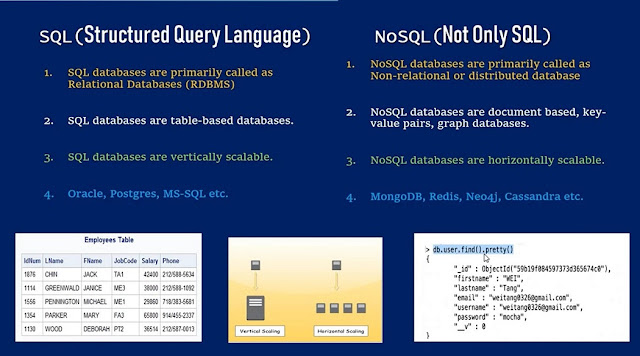
Difference between MongoDB & SQL Database

Below are some of the key term differences between SQL Database and MongoDB 

SQL Database

NoSQL Database (MongoDB)

Relational database

Non-relational database

Supports SQL query language

Supports JSON query language

Table based

Collection based and key-value pair

Row based

Document based

Column based

Field based

Support foreign key

No support for foreign key

Support for triggers

No Support for triggers

Contains schema which is predefined

Contains dynamic schema

Not fit for hierarchical data storage

Best fit for hierarchical data storage

Vertically scalable - increasing RAM

Horizontally scalable - add more servers

Emphasizes on ACID properties (Atomicity, Consistency, Isolation and Durability)

Emphasizes on CAP theorem (Consistency, Availability and Partition tolerance)


Introduction to NoSQL

NoSQL, as many of you may already know, is basically, a database used to manage huge sets of unstructured data, where in the data is not stored in tabular relations like relational databases. Most of the currently existing Relational Databases have failed in solving some of the complex modern problems like :

  • Continuously changing nature of data - structured, semi-structured, unstructured and polymorphic data.
  • Applications now serve millions of users in different geo-locations, in different timezones and have to be up and running all the time, with data integrity maintained
  • Applications are becoming more distributed with many moving towards cloud computing.

NoSQL plays a vital role in an enterprise application which needs to access and analyze a massive set of data that is being made available on multiple virtual servers (remote based) in the cloud infrastructure and mainly when the data set is not structured. Hence, the NoSQL database is designed to overcome the Performance, Scalability, Data Modelling and Distribution limitations that are seen in the Relational Databases.

What is Structured Data?

Structured data is usually text files, with defined column titles and data in rows. Such data can easily be visulaized in form of charts and can be processed using data mining tools.


What is Unstructured Data?

Unstructured data can be anything like video file, image file, PDF, Emails etc. What does these files have in common, nothing. Structured Information can be extracted from unstructured data, but the process is time consuming. And as more and more modern data is unstructured, there was a need to have something to store such data for growing applications, hence setting path for NoSQL.

NoSQL Database Types

Following are the NoSQL database types :

  • Document Databases : In this type, key is paired with a complex data structure called as Document. Example : MongoDB
  • Graph stores : This type of database is ususally used to store networked data. Where in we can relate data based on some existing data.
  • Key-Value stores : These are the simplest NoSQL databases. In this each is stored with a key to identify it. In some Key-value databases, we can even save the typr of the data saved along, like in Redis.
  • Wide-column stores : Used to store large data sets(store columns of data together). Example : Cassandra(Used in Facebook), HBase etc.


Friday, May 8, 2020

Include and Require Keyword

Including a PHP File into Another PHP File: The include() and require() statement allows you to include the code contained in a PHP file within another PHP file. Including a file produces the same result as copying the script from the file specified and pasted into the location where it is called. 

You can save a lot of time and work through including files — Just store a block of code in a separate file and include it wherever you want using the include() and require() statements instead of typing the entire block of code multiple times. A typical example is including the header, footer and menu file within all the pages of a website.

The basic syntax of the include() and require() statement can be given with:

include("path/to/filename"); -Or- include "path/to/filename";
require("path/to/filename"); -Or- require "path/to/filename";

Note:  Like the print and echo statements, you can omit the parentheses while using the include and require statements as demonstrated above.

The following example will show you how to include the common header, footer and menu codes which are stored in separate 'header.php', 'footer.php' and 'menu.php' files respectively, within all the pages of your website. Using this technique you can update all pages of the website at once by making the changes to just one file, this saves a lot of repetitive work.

<!DOCTYPE html>

<html lang="en">

<head>

    <title>Tutorial Republic</title>

</head>

<body>

<?php include "header.php"?>

<?php include "menu.php"?>

    <h1>Welcome to Our Website!</h1>

    <p>Here you will find lots of useful information.</p>

<?php include "footer.php"?>

</body>

</html>


Difference Between include and require Statements

You might be thinking if we can include files using the include() statement then why we need require(). Typically the require() statement operates like include().

The only difference is — the include() statement will only generate a PHP warning but allow script execution to continue if the file to be included can't be found, whereas the require() statement will generate a fatal error and stops the script execution.

<?php require "my_variables.php"?>

<?php require "my_functions.php"?>

<!DOCTYPE html>

<html lang="en">

<head>

    <title><?php displayTitle($home_page); ?></title>

</head>

<body>

<?php include "header.php"?>

<?php include "menu.php"?>

    <h1>Welcome to Our Website!</h1>

    <p>Here you will find lots of useful information.</p>

<?php include "footer.php"?>

</body>

</html>


Note: It is recommended to use the require() statement if you're including the library files or files containing the functions and configuration variables that are essential for running your application, such as database configuration file.

The include_once and require_once Statements

If you accidentally include the same file (typically functions or classes files) more than one time within your code using the include or require statements, it may cause conflicts. To prevent this situation, PHP provides include_once and require_once statements. These statements behave in the same way as include and require statements with one exception.

The include_once and require_once statements will only include the file once even if asked to include it a second time i.e. if the specified file has already been included in a previous statement, the file is not included again. To better understand how it works, let's check out an example. Suppose we've a 'my_functions.php' file with the following code: 

<?php

function multiplySelf($var){

    $var *= $var// multiply variable by itself

    echo $var;

}

?>

Here's is the PHP script within which we've included the 'my_functions.php' file. 

<?php

// Including file

require "my_functions.php";

// Calling the function

multiplySelf(2); // Output: 4

echo "<br>";


// Including file once again

require "my_functions.php";

// Calling the function

multiplySelf(5); // Doesn't execute

?>

When you run the above script, you will see the error message something like this: "Fatal error: Cannot redeclare multiplySelf()". This occurs because the 'my_functions.php' included twice, this means the function multiplySelf() is defined twice, which caused PHP to stop script execution and generate fatal error. Now rewrite the above example with require_once.

<?php

// Including file

require_once "my_functions.php";

// Calling the function

multiplySelf(2); // Output: 4

echo "<br>";


// Including file once again

require_once "my_functions.php";

// Calling the function

multiplySelf(5); // Output: 25

?>

As you can see, by using require_once instead of require, the script works as we expected.


Thursday, May 7, 2020

PHP String Functions

In this section, we will discuss a few basic string functions which are most commonly used in PHP scripts.

1. Getting length of a String: PHP has a predefined function to get the length of a string. Strlen() displays the length of any string. It is more commonly used in validating input fields where the user is limited to enter a fixed length of characters.

<?php
echo strlen("Welcome to Cloudways");    //will return the length of given string
?>

Output

20


2. Counting of the number of words in a String: Another function that enables the display of the number of words in any specific string is str_word_count(). This function is also useful in the validation of input fields.

<?php
echo str_word_count("Welcome to Cloudways");
//will return the number of words in a string
?>
 

Output

3


3. Reversing a String: Strrev() is used for reversing a string. You can use this function to get the reverse version of any string.

<?php
echo strrev(“Welcome to Cloudways”);// will return the string starting from the end
?>

Output

syawduolC ot emocleW


4. Finding Text Within a String: Strpos() enables searching particular text within a string. It works simply by matching the specific text in a string. If found, then it returns the specific position. If not found at all, then it will return “False”. Strops() is most commonly used in validating input fields like email.

<?php
echo strpos(“Welcome to Cloudways”,”Cloudways”);
?>

Output

11


5. Replacing text within a string: Str_replace() is a built-in function, basically used for replacing specific text within a string.

<?php
echo str_replace(“cloudways”, “the programming world”, “Welcome to cloudways”);
?>

Output

Welcome to the programming world


6. Converting lowercase into Title Case: Ucwords() is used to convert first alphabet of every word into uppercase.

<?php
echo ucwords(“welcome to the php world”);
?>

Output

Welcome To The Php World


7. Converting a whole string into UPPERCASE: Strtoupper() is used to convert a whole string into uppercase.

<?php
echo strtoupper(“welcome to cloudways”);// It will convert all letters of string 
                                            into uppercase
?>

Output

WELCOME TO CLOUDWAYS


8. Converting whole String to lowercase: Strtolower() is used to convert a string into lowercase.

<?php
echo strtolower(“WELCOME TO CLOUDWAYS”);

?>

Output

welcome to cloudways


9. Repeating a String: PHP provides a built-in function for repeating a string a specific number of times.

<?php
echo str_repeat(“=”,13);

?>

Output

=============


10. Comparing Strings: You can compare two strings by using strcmp(). It returns output either greater than zero, less than zero or equal to zero. If string 1 is greater than string 2 then it returns greater than zero. If string 1 is less than string 2 then it returns less than zero. It returns zero, if the strings are equal.

<?php
echo strcmp(“Cloudways”,”CLOUDWAYS”);
echo “<br>”;
echo strcmp(“cloudways”,”cloudways”);//Both the strings are equal
echo “<br>”;
echo strcmp(“Cloudways”,”Hosting”);
echo “<br>”;
echo strcmp(“a”,”b”);//compares alphabetically
echo “<br>”;
echo strcmp(“abb baa”,”abb baa caa”);//compares both strings and returns the result 
                                        in terms of number of characters.
?>

Output

1

0

-1

-1

-4


11. Displaying part of String: Through substr() function you can display or extract a string from a particular position.

<?php
echo substr(“Welcome to Cloudways”,6).”<br>”;
echo substr(“Welcome to Cloudways”,0,10).”<br>”;
?>

Output

e to Cloudways

Welcome to


12. Removing white spaces from a String: Trim() is dedicated to remove white spaces and predefined characters from a both the sides of a string.

<?php
$str = “Wordpess Hosting”;
echo $str . “<br>”;
echo trim(“$str”,”Wording”);
?>

Output

Wordpess Hosting

pess Host