Wednesday, April 1, 2020

Angular Architecture


Angular is a platform and framework for building client applications in HTML and TypeScript. Typescript is a superset of Javascript. Angular is written in TypeScript. It implements core and optional functionality as a set of TypeScript libraries that you import into your apps. The pioneer building blocks of the Angular application are NgModules, which provide the compilation context for components.
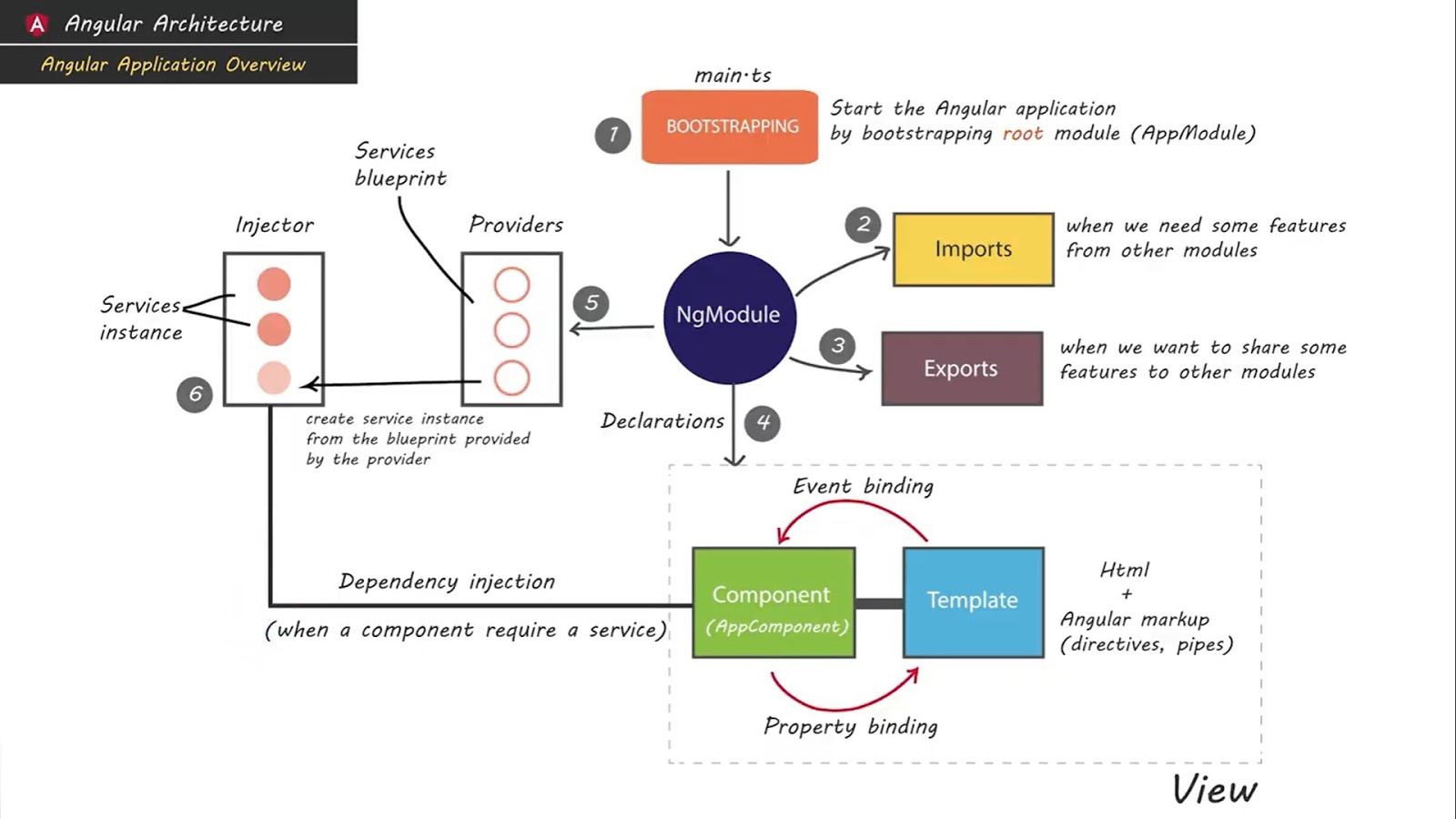
We can identify the following main building blocks of an Angular Application.
1.   Modules
2.   Components
3.   Templates
4.   Metadata
5.   Data binding
6.   Directives
7.   Services
8.   Dependency Injection

A set of NgModules defines the angular appand it always has at least a root module that enables bootstrapping, and many more feature modules.
  1. Components define Template views
  2. Components use services

The Angular Module (NgModules) helps us to organize an application into connected blocks of functionality.
Angular Modules
Every Angular app has a root module, conventionally named AppModule, which provides the bootstrap mechanism that launches the application. An app typically contains many functional modules.
// app.module.ts

import { BrowserModule } from '@angular/platform-browser';
import { NgModule } from '@angular/core';

import { AppRoutingModule } from './app-routing.module';
import { AppComponent } from './app.component';

@NgModule({
  declarations: [
    AppComponent
  ],
  imports: [
    BrowserModule,
    AppRoutingModule
  ],
  providers: [],
  bootstrap: [AppComponent]
})
export class AppModule { }
If we want to use another custom Angular module, then we need to register that module inside the app.module.ts file. Organizing your code into distinct functional modules helps in managing the development of complex applications, and in designing for reusability.
Angular  Components
Every Angular project has at least one component, the root component and root component connects the component hierarchy with a page document object model (DOM). Each component defines the class that contains application data and logic, and it is associated with the HTML template that defines the view to be displayed in a target app.
The @Component decorator identifies the class immediately below it as the component and provides the template and related component-specific metadata.
// app.component.ts

@Component({
  selector: 'app-root',
  templateUrl: './app.component.html',
  styleUrls: ['./app.component.css']
})
Angular  Templates
The angular template combines the HTML with Angular markup that can modify HTML elements before they are displayed. Template directives provide program logic, and binding markup connects your application data and the DOM. There are two types of data binding.
  • Event binding lets your app respond to user input in the target environment by updating your application data.
  • Property binding lets you interpolate values that are computed from your application data into the HTML.
<div style="text-align:center">
  <h1>
    {{2 | power: 5}}
  </h1>
</div>
In the above HTML file, we have used a template. We have also used the pipe inside the template to transform the values to the desired output.
Angular  Metadata
Metadata is used to decorate the class so that it can configure the expected behavior of a class. Decorators are the core concept when developing with Angular (versions 2 and above). The user can use metadata to a class to tell Angular app that AppComponent is the component. Metadata can be attached to the TypeScript using the decorator.
// app.component.ts

@Component({
  selector: 'app-root',
  templateUrl: './app.component.html',
  styleUrls: ['./app.component.css']
})
@Component is a decorator which makes use of configuration object to create the component and its view.
Angular  Data Binding
Angular allows defining communication between a component and the DOM, making it very easy to define interactive applications without worrying about pulling and pushing the data.
From the Component to the DOM
Interpolation: {{ value }}: Interpolation adds the value of the property from the component.
<p>Name: {{ student.name }}</p>
<p>College: {{ student.college }}</p>
Property binding: [property]=”value”
With property binding, a value is passed from a component to a specified property, which can often be a simple html attribute.
<input type="text" [value]="student.name" />
<input type="text" [value]="student.college" />
Angular  Directives
An Angular component isn’t more than a directive with the template. When we say that components are the building blocks of Angular applications, we are saying that directives are the building blocks of Angular projects. Let us use built-in Angular directive like ngClass, which is a better example of the existing Angular attribute directive.
<p [ngClass]="{'coffee'=true, 'red'=false}">
    Angular 7 Directives Example
</p>

<style>
    .coffee{color: coffee}
    .red{color: red}
</style>
Here, based on the [ngClass] directive’s value, the text has color. In our example, the text will be coffee because it is true.
Angular  Services
For data or logic that isn’t associated with a specific view, and that you want to share across components, you create a service class. The @Injectable decorator immediately precedes the service class definition. The decorator provides the metadata that allows your service to be injected into client components as a dependency. Angular distinguishes components from services to increase modularity and reusability. By separating a component’s view-related functionality from other kinds of processing, you can make your component classes lean and efficient.
Angular  Dependency Injection
Dependency injection (DI) lets you keep your component classes lean and efficient. DI does not fetch data from a server, validate the user input, or log directly to the console instead they delegate such tasks to the services. DI is wired into a Angular framework and used everywhere to provide new components with the services or other things they need. Components consume services; that is, you can inject a service into a component, giving the component access to that service class.


Difference between TypeScript and JavaScript


JavaScript (JS) and TypeScript (TS) are two widely used programming languages that are popular for their feature-rich benefits. JavaScript was first introduced as a client-side language for developers. Later on, it was found that JavaScript could also be used for server-side programming purposes. Over time, JavaScript codes became heavy and complex and failed to fulfill the purpose of general object-oriented programming languages. There were gaps that emerged in terms of JavaScript being used as a server-side technology for enterprise-level development. Thereafter, TypeScript was developed to help developers take care of these shortfalls.
We will begin with a comparison chart depicting the difference between TypeScript and JavaScript. We will discuss why developers use JavaScript and TypeScript, the features of JavaScript and TypeScript, etc.


Typescript vs. JavaScript

Comparison Chart: Primary Differences Between JavaScript and TypeScript

JavaScript
TypeScript
It is a scripting language
It is an OOP (object-oriented programming) language
Static typing feature is not available
Static typing feature is present; it is a light-weight
No support for modules is present in JavaScript
TypeScript supports modules in the development process
Interface is not present
TypeScript contains an interface that makes development more convenient and user-friendly
The optional parameter function is not supported by JavaScript
TypeScript provides support for optional parameter functions
Specifically used for client-side operations
Used for both client and server-side operations
.js
.ts, .tsx
In JavaScript, all the codes are written within the <> script tags. This tells the browser to start interpreting the text that’s written as code within the tags during run time.
The codes written in TypeScript comprise of modules, functions, variables, comments, statements and expressions.
·   It boasts of a huge active community comprising of developers.
·      JavaScript supports native browsers and cuts out on one extra step of compiling as is required in TypeScript.
·       More flexibility.

·       Static Typing
·   More preferable for complex, large-sized projects
·      A better option for collaboration especially when there are many   developers working on large projects.
·   Type safety presents sound features for detecting errors right at the coding time. This leads to efficient coding, higher productivity and easy debugging.

What is JavaScript?
JavaScript or JS is a development language that is used for updating and changing HTML and CSS codes. This popular dynamic programming language is mainly utilized for web development and for enhancing HTML pages. JavaScript can calculate, assess, manipulate, validate and test data. JavaScript is generally used as client-side scripting and coding language. When anyone requests an HTML page that has JavaScript code in its, the script goes to the browser; the browser is responsible for taking the requisite actions. JS is the brainchild of Brendan Eich. It first made its appearance in the year 1995 when it was used by the Netscape Navigator browser attributed to Netscape.

Features of Javascript
  1. JavaScript is an object-based programming language that gives users a lot of control on the browser.
  2. It is light-weighted.
  3. JavaScript is case sensitive.

What is Typescript?       
Typescript is a popular open-source development language. It can be defined as the next- level of JavaScript for application-scale development purposes. This programming language is an object oriented, strongly typed, compiled language. TypeScript serves the dual purpose of a set of tools and a language. Invented by Anders Hejlsberg, TypeScript is licensed by Apache 2. Also referred to as a superset of JavaScript, TypeScript is designed and developed for taking care of complicated projects. It comes packaged with extra loaded features in addition to those present in Java Script. All TypeScript codes are changed into JavaScript equivalents for their execution.

Features of TypeScript
  1. TypeScript provides support for JavaScript libraries and can access JavaScript frameworks and tools as well as other libraries easily.
  2. JavaScript with valid .js extension can be converted to TypeScript by changing the extension from .js to .ts; they can be compiled with other TypeScript files.
  3. TypeScript is portable and can run on all devices, browsers, devices and operating systems.
Advantages of using TypeScript over JavaScript
Why typescript? There are certain advantages of using TypeScript in comparison to JavaScript:
1. The compilation errors are pointed out by TypeScript in the course of development only. This is not possible in the case of JavaScript. Because of this important feature of typescript, there are few chances of errors occurring during run time. JavaScript, being an interpreter-based language, fails to provide this feature.
2. TypeScript supports static typing; its features are supportive of strongly-typed codes that allow for the checking of type correctness during the time of compilation. Here, TypeScript scores over JavaScript as this feature is not found in the latter.
3. TypeScript has some additional features, for example, ES6 features, of JavaScript. The TypeScript compiler is capable of compiling the .ts files in line with the ES6 features as well as those belonging to ES3, ES4 and ES5 features. However, it is important for developers to check if these features are supported by their target browsers or not.
4. The main advantage that Typescript has over JavaScript is that it is designed for developing complex and large programs. It is a superset of JavaScript. TypeScript codes can be trans compiled to JavaScript.
5. Typescript is supportive of definition file that can store file type information comprising of existing JavaScript libraries, such as the C++ header files. In turn, this feature helps other programs utilize the values that are defined in those specific files. This is not possible with JavaScript.

Conclusion
The choice of TypeScript or JavaScript would depend on the complexity and size of the project for which they are used. Knowledge of the primary differences between typescript and JavaScript helps in understanding the application of these two languages. In case you have any further queries with regards to what is typescript, what is JavaScript, benefits in the relation of JavaScript to typescript, or the differences between typescript vs JavaScript, then write to us. We will be happy to provide the most suitable answers to your queries at the earliest.