Wednesday, April 1, 2020

Introduction to Angular

"Angular is a platform that makes it easy to build applications with the web. Angular combines declarative templates, dependency injection, end to end tooling, and integrated best practices to solve development challenges. Angular empowers developers to build applications that live on the web, mobile, or the desktop". 

Single Page Applications

Basically, when people talk about Angular, they talk about it as a JavaScript framework. It is used to build so-called Single Page Applications (SPA). These SPA's typically (but not only) use the browsers JavaScript environment to emulate the behavior of normal websites.

Because they don't rely on a server at all, they can do things, that we would expect from native applications. They have the ability to manage their state completely client-side, enabling a richer and much more fluent user experience.
Furthermore. server-round-trips can be avoided to a bare minimum, resulting in an overall more responsive application.

Thanks to technologies like Service Workers and Progressive Web Apps, these applications can become almost indistinguishable from native applications, especially on mobile (Android) devices.

The Framework

The Angular framework enables us to write these single page applications with ease. It comes with features like data-binding, change-detection, forms, routing & navigation and an HTTP-implementation right out of the box.
Angular was originally intended to be used with the programming languages JavaScript, TypeScript and Dart. And although it is still possible to use it with all of these languages, the by far most popular language of choice became TypeScript.
I would highly recommend using TypeScript, as the other versions are not only lacking documentation and community, but updates are also released much later (months not days) than for the TypeScript version.

The Platform

Over time, the angular developers have developed a great ecosystem around the framework.
Tools like the Angular-Cli, Angular Universal and Angular Material got added to the project. These tools added great features like fast project generation, server-side rendering, and stunning UI components, that are not coupled with the core-framework itself, but completely optional.
That is why angular is referred to as a platform. It provides all the tools, that you need, to develop great angular applications, without relying too much on third-party libraries. Because of this opinionated approach, most developers are using these tools, resulting in a great documentation, community help, and blog posts.

Is it called AngularJS or Angular ?

Maybe one of the greatest downsides of angular, to me, is the version and naming chaos that emerged after the Angular 2 release. Google decided to row back from the terms Angular 2, Angular 4, Angular 5, but to refer to them as just "Angular".
Don't get me wrong, having the universal "Angular" name for all version 2+ was the right decision, in my opinion. But this more general term makes searching (Google etc.) and finding the right information really hard.

Angular Features

A list of the most important features and benefits of Angular:

1.     Angular supports multiple platforms: Angular is a cross-platform language. It supports multiple platforms. You can build different types of apps by using Angular.

·      Desktop applications: Angular facilitates you to create desktop installed apps on different types of operating systems i.e. Windows, Mac or Linux by using the same Angular methods which we use for creating web and native apps.
·       Native applications: You can build native apps by using Angular with strategies from Cordova, Ionic, or NativeScript.
·    Progressive web applications: Progressive web applications are the most common apps which are built with Angular. Angular provides modern web platform capabilities to deliver high performance, offline, and zero-step installation apps.

2.     High Speed, Ultimate Performance: Angular is amazingly fast and provides a great performance due to the following reasons:

·       Universal support: Angular can be used as a front-end web development tool for the programming languages like Node.js, .Net, PHP, Java Struts and Spring and other servers for near-instant rendering in just HTML and CSS. It also optimizes the website for better SEO.
·      Code splitting: Angular apps are fast and loads quickly with the new Component Router, which delivers automatic code-splitting so users only load code required to render the view they request.
·    Code generation: Angular makes your templates in highly optimized code for today?s JavaScript virtual machines which gives the benefits of hand-written code.

3.     Productivity: Angular provides a better productivity due to its simple and powerful template syntax, command-line tools and popular editors and IDEs.

·      Powerful templates: Angular provides simple and powerful template syntax to create UI view quickly.
·     IDEs: Angular provides intelligent code completion, instant errors, and other feedback in popular editors and IDEs.
·      Angular CLI: Angular CLI provides command line tools start building fast, add components and tests, and then instantly deploy.

4.     Full Stack Development: Angular is a complete framework of JavaScript. It provides Testing, animation, and Accessibility. It provides full-stack development along with Node.js, Express.js, and MongoDB.

·      Testing: Angular provides Karma and Jasmine for unit testing. B y using it, you can check your broken things every time you save. Karma is a JavaScript test runner tool created by Angular team. Jasmine is the testing framework form unit testing in Angular apps, and Karma provides helpful tools that make it easier to us to call our Jasmine tests whilst we are writing code.
·     Animation Support: Angular facilitates you to create high-performance, complex choreographies and animation timelines with very little code through Angular's intuitive API.
·   Accessibility: In Angular, you can create accessible applications with ARIA-enabled components, developer guides, and built-in test infrastructure.
Monday, March 30, 2020

PHP File Handling


What is a File?

A file is simply a resource for storing information on a computer. Files are usually used to store information such as;
  • Configuration settings of a program
  • Simple data such as contact names against the phone numbers.
  • Images, Pictures, Photos, etc.

PHP File Formats Support

PHP file functions support a wide range of file formats that include;
  • File.txt
  • File.log
  • File.custom_extension i.e. file.xyz
  • File.csv
  • File.gif, file.jpg etc
  • Files provide a permanent cost-effective data storage solution for simple data compared to databases that require other software and skills to manage DBMS systems.
  • You want to store simple data such as server logs for later retrieval and analysis
  • You want to store program settings i.e. program.ini
PHP File Handling
File handling is needed for any application. For some tasks to be done file needs to be processed. File handling in PHP is similar to file handling is done by using any programming language like C. PHP has many functions to work with normal files. Functions related to files: 
  • Opening a file
  • Reading a file
  • Writing a file
  • Closing a file

Opening and Closing Files

The PHP fopen() function is used to open a file. It requires two arguments stating first the file name and then mode in which to operate.

Files modes can be specified as one of the six options in this table.


Sr.No
Mode & Purpose
1
r
Opens the file for reading only.
Places the file pointer at the beginning of the file.
2
r+
Opens the file for reading and writing.
Places the file pointer at the beginning of the file.
3
w
Opens the file for writing only.
Places the file pointer at the beginning of the file.
and truncates the file to zero length. If files does not
exist then it attempts to create a file.
4
w+
Opens the file for reading and writing only.
Places the file pointer at the beginning of the file.
and truncates the file to zero length. If files does not
exist then it attempts to create a file.
5
a
Opens the file for writing only.
Places the file pointer at the end of the file.
If files does not exist then it attempts to create a file.
6
a+
Opens the file for reading and writing only.
Places the file pointer at the end of the file.
If files does not exist then it attempts to create a file.

If an attempt to open a file fails then fopen returns a value of false otherwise it returns a file pointer which is used for further reading or writing to that file.

After making changes to the opened file it is important to close it with the fclose() function. The fclose() function requires a file pointer as its argument and then returns true when the closure succeeds or false if it fails.

Reading a file

Once a file is opened using fopen() function it can be read with a function called fread(). This function requires two arguments. These must be the file pointer and the length of the file expressed in bytes.
The files length can be found using the filesize() function which takes the file name as its argument and returns the size of the file expressed in bytes.
So here are the steps required to read a file with PHP.
·      Open a file using fopen() function.
·      Get the file's length using filesize() function.
·      Read the file's content using fread() function.
·      Close the file with fclose() function.
The following example assigns the content of a text file to a variable then displays those contents on the web page.
<html>  
   <head>  
    <title>Reading a file using PHP</title>  
   </head>  
   <body>  
    <?php  
      $filename = "tmp.txt";  
      $file = fopen( $filename, "r" );  
      if( $file == false ) {  
       echo ( "Error in opening file" );  
       exit();  
      }  
      $filesize = filesize( $filename );  
      $filetext = fread( $file, $filesize );  
      fclose( $file );  
      echo ( "File size : $filesize bytes" );  
      echo ( "<pre>$filetext</pre>" );  
    ?>  
   </body>  
 </html>
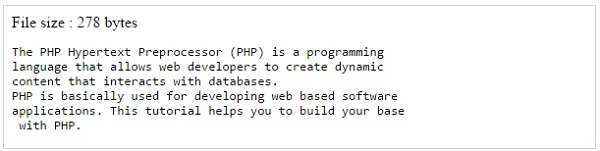
It will produce the following result −
Reading File

Writing a file

A new file can be written or text can be appended to an existing file using the PHP fwrite() function. This function requires two arguments specifying a file pointer and the string of data that is to be written. Optionally a third integer argument can be included to specify the length of the data to write. If the third argument is included, writing would will stop after the specified length has been reached.
The following example creates a new text file then writes a short text heading inside it. After closing this file its existence is confirmed using file_exist() function which takes file name as an argument
<?php  
   $filename = "/home/user/guest/newfile.txt";  
   $file = fopen( $filename, "w" );  
   if( $file == false ) {  
    echo ( "Error in opening new file" );  
    exit();  
   }  
   fwrite( $file, "This is a simple test\n" );  
   fclose( $file );  
 ?>  
 <html>  
   <head>  
    <title>Writing a file using PHP</title>  
   </head>  
   <body>  
    <?php  
      $filename = "newfile.txt";  
      $file = fopen( $filename, "r" );  
      if( $file == false ) {  
       echo ( "Error in opening file" );  
       exit();  
      }  
      $filesize = filesize( $filename );  
      $filetext = fread( $file, $filesize );  
      fclose( $file );  
      echo ( "File size : $filesize bytes" );  
      echo ( "$filetext" );  
      echo("file name: $filename");  
    ?>  
   </body>  
 </html> 
It will produce the following result −
Writing File
We have also covered all the functions related to file input and out in PHP File System Function chapter.
·       feof(): function can be used to check if the “End-Of-File” (EOF) has been reached. This is very useful as we can loop through a file of unknown length. We can do this on every file in any mode.
<?php
$file = fopen(“demo.txt”,”r”) or exit (“ERROR: cannot open file”);
while(!feof($file))
{
echo fgets($file)
}
fclose($file);
?>
·       fgetc(): The fgetc() function is used to read a character from a file.
<? php
$file = fopen("demo.txt", "r") or exit("ERROR: cannot open file");
while(!feof($file))
{
echo
fgetc($file);
}
fclose($file);
?>
·     file_get_contents(): To read the local disk files in PHP, file_get_contents() function is used. This function accepts the name and path of a disk file, and reads the entire file into a string variable at once.
<?php
//read file into string
$str =
file_get_contents(‘demo.txt’) or die(‘ERROR: cannot find file’);
echo $str;
?>
·       file(): An alternative method of reading data from a file is PHP’s file() function. It accepts the name and path of the file and reads the entire file into an array, which has each element of the array representing one line of the file. We iterate through the array using foreach loop to access the elements of the array.
<?php
//read file into an array
$arr=
file(“demo.txt”) or die(“ERROR: cannot find file”);
foreach($arr as $line)
{
echo $line;
}
?>
·      Reading Remote Files: Both file_get_contents() and file() support reading data from URLs, using either the HTTP or FTP protocol. It reads an HTML file of the Web into an array.
<?php
//read file into array
$arr=
file (“https://www.google.com”) or die (“ERROR: cannot find file”);
foreach($arr as $line)
{
echo $line;
}
?>


NOTE: In case of slow network links, it is more efficient to read a remote file in “chunks,” to maximize the efficiency of available network bandwidth. fgets() function can read a specific number of bytes from a file.
<?php
 //read file into array (chunks)  
 $str="";  
 $file=fopen('http://www.google.com',"r") or die('ERROR: cannot open file');  
 while(!feof($file))  
 {  
 $str=fgets($file,512);  
 //it opens only 512 bytes of data  
 }  
 fclose($file);  
 echo $str;  
 ?> 
·       file_put_contents(): The file_put_contents() function accepts a filename and the data to be written to the file.
<?php
//write string to file
$data=”this is n the n first line n”;
file_put_contents(“output.txt”,$data) or die(“ERROR: cannot write file”);
echo “data written to file”;
?>
·       Create a file: touch( ) function is used to create a file Syntax

<?php
//create a ms word file
touch("resume.doc");
//create text file
touch("data.txt");
//create pdf file
touch('corephp.pdf');
?>

Output: Check your folder manually (same folder where you have saved your program) a file will be created

·       Delete a file: unlink( ) function is used to delete a file Syntax

<?php
//delete  resume word file
 unlink("resume.doc");
//delete text file
unlink("data.txt");
//delete pdf file
unlink('corephp.pdf');
?>

Output: Check your folder manually (same folder where you have saved your program) a file will be deleted

·       copy a file: copy( ) function is used to copy file Syntax

<?php
//copy resume doc
 copy("resume.doc","Update resume.doc");
//copy text file
 copy("data.txt","update data.txt");             
?>

Output: Check your folder manually (same folder where you have saved your program) a file will be copied with new name

·       Rename file: rename( ) function is used to rename file. Syntax

<?php
//rename resume doc
 rename("resume.doc","Update resume.doc");
//rename text file
 rename("data.txt","update data.txt");           
?>

Output: Check your folder manually (same folder where you have saved your program) a file will be renamed

·       Checks whether a file or directory exists: file_exists( ) function is used to check file or directory existence.

<?php
//check file existence
echo file_exists("Update resume.doc");
?>

Output: It returns true(1) if file exists otherwise return false(blank screen)

·       Check Path of the file: realpath( ) function is used to check real path of the file. Syntax

<?php
//check real path of the file
echo realpath("Update_resume.doc");
?>

Output:  c:\xampp\htdocs\Updated_Resume.doc

Be careful when manipulating files!
When you are manipulating files you must be very careful.
You can do a lot of damage if you do something wrong. Common errors are: editing the wrong file, filling a hard-drive with garbage data, and deleting the content of a file by accident.
